
π—π€πˆ π—π€ππˆ

π»π‘œπ‘™π‘œπ‘”π‘Ÿπ‘Žπ‘β„Žπ‘–π‘ Β· 𝑆𝑒𝑏-π‘–π‘›π‘“π‘œπ‘Ÿπ‘šπ‘Žπ‘‘π‘–π‘œπ‘› πΆπ‘œπ‘›π‘π‘’π‘π‘‘ 𝐷𝑒𝑠𝑖𝑔𝑛

Don't have an account?Sign up

Activation code and API key will be sent to this email. (May be delayed or filtered as spam.)

Verification Code Sent!

Please click the activation link in your email to complete registration.

API Base URL:

The API Key will also be included in the activation email. Please keep it safe.

May be delayed or in spam.

Already have an account? Login now

Β© 2022-2026 XABC Labs

π—π€πˆ π—π€ππˆ

Base API:
Unlicensed
Sub-account tools are disabled for this account. Purchasing a higher-tier plan will automatically enable sub-account access so you can allocate usage to team members. Contact an admin if you need help.

You can query data within 3 years

Today

Today's Quota Status

Loading Syncing

Syncing today's request limits, token limits, and credit card status.

RPD --
-- --
TPD --
-- --
Daily Credit --
-- --

Card Usage Progress

--
Loading card usage progress…

Total Cost

\$0.00

Total Requests

0

Web Searches

0

Images

0

Total Tokens

0

Input Tokens

0

Output Tokens

0

Cache R/W

0

Model Cost Distribution

Model Request Distribution

Model Usage Details

Model Requests Searches Input Tokens Output Tokens Cache R/W Images Cost Percentage

Daily Usage Statistics

Date Requests Cost Tokens Images Primary Model

My Account

Profile

Update the alias shown in the top-right corner, your login email, and billing notifications

-

Globally unique, used to receive the XAI API Key and system notifications

Used for billing notices; leaving it empty falls back to the current login email

Supported format: XAI API Keys starting with sk-Xvs...

Query Results

🌐 Supported AI Service Providers

✨ The XAI platform is compatible with virtually all major AI providers and model ecosystems, supporting unified integration and flexible switching.

🧭 How It Works

One entrypoint handles auth, routing, and normalization before reaching model providers.
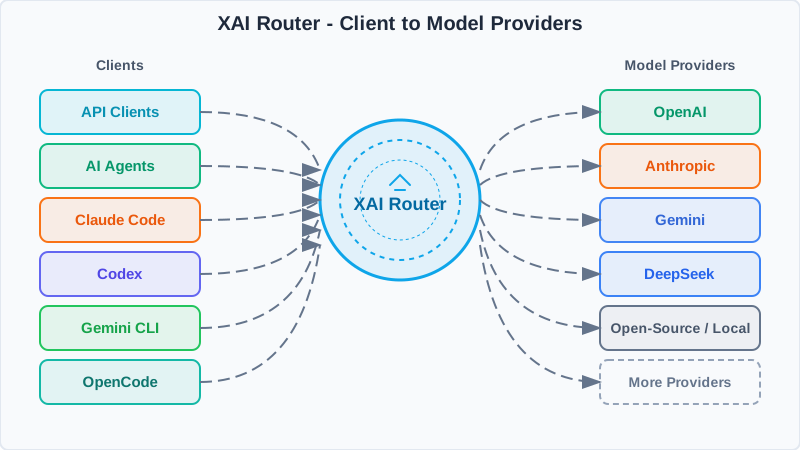
XAI Router
XAI Router architecture diagram
XAI Router sits between clients and providers to apply policies, map models, and return consistent responses.
1

Single entrypoint

Use one XAI API key and a unified base_url.

2

Smart routing

Policies, model mapping, rate limits, and observability live in the router.

3

Provider fan-out

Requests go to OpenAI, Claude, Gemini, and more, then normalize on the way back.

πŸ’» SDK Examples

OpenAI SDK Example

import os
from openai import OpenAI

XAI_API_KEY = os.getenv("XAI_API_KEY")
client = OpenAI(
    api_key=XAI_API_KEY,
    base_url="",
)

completion = client.chat.completions.create(
    model="gpt-5",
    messages=[
	{"role": "system", "content": "You are AI"},
	{"role": "user", "content": "What is the meaning of life, the universe, and everything?"},
    ],
)

print(completion.choices[0].message)

Anthropic SDK Example

import os
from anthropic import Anthropic

XAI_API_KEY = os.getenv("XAI_API_KEY")
client = Anthropic(
    api_key=XAI_API_KEY,
    base_url="",
)
message = client.messages.create(
    model="claude-sonnet-4-6",
    max_tokens=128,
    system="You are AI.",
    messages=[
	{
	    "role": "user",
	    "content": "What is the meaning of life, the universe, and everything?",
	},
    ],
)
print(message.content)

πŸ§ͺ cURL Examples

OpenAI /responses

curl /responses \
  -H "Content-Type: application/json" \
  -H "Authorization: Bearer $XAI_API_KEY" \
  -d '{
    "model": "gpt-5.4",
    "input": "Explain what the Responses API does in one sentence."
  }'

OpenAI /chat/completions

curl /chat/completions \
  -H "Content-Type: application/json" \
  -H "Authorization: Bearer $XAI_API_KEY" \
  -d '{
    "model": "gpt-5.2",
    "messages": [
      {
        "role": "developer",
        "content": "You are a helpful assistant."
      },
      {
        "role": "user",
        "content": "Hello!"
      }
    ]
  }'

Anthropic /messages

curl /v1/messages \
  -H 'Content-Type: application/json' \
  -H 'anthropic-version: 2023-06-01' \
  -H "X-Api-Key: $XAI_API_KEY" \
  -d '{
    "max_tokens": 1024,
    "messages": [
      {
        "content": "Hello, world",
        "role": "user"
      }
    ],
    "model": "claude-sonnet-4-6"
  }'

Create New Sub-account

Email address must be unique and cannot duplicate existing accounts
2-32 characters; letters, numbers, Chinese, _ and - are allowed, and at least one letter is required

API Call Examples

cURL

Python

JavaScript

Fund/Deduct Sub-account

Support query by system identifier or user ID

Must be > 0 and <= 365 days; defaults to 365 when empty

API Call Examples

cURL

Python

JavaScript

Top Up Your Account

After payment succeeds, system credits are added automatically; the credited amount is your platform usage balance, not a withdrawable cash balance. First time here? Start with the quick guide below.

First time buying a plan?

Pick your usage pattern first, then pick a plan

Our main offer is the Codex plan family. Core models include gpt-5.5, gpt-5.4, gpt-5.4-mini, gpt-5.3-codex, and gpt-5.3-codex-spark. This model set works well in Codex CLI / App and direct API usage. It also offers Claude API compatibility, so the same subscription can be used from Claude Code.

Choose by usage scenario first

Start by separating monthly subscription resources, pay-as-you-go balance, and daily overflow top-ups.

Most common
I mainly use Codex CLI / App for coding, and may also use Claude Code

Start with a Codex subscription plan. It is built around gpt-5.5, gpt-5.4, gpt-5.4-mini, gpt-5.3-codex, and gpt-5.3-codex-spark for day-to-day AI coding workflows.

The same plan also works through Claude API compatibility. If you are unsure where to start, begin with a lower tier and watch whether you regularly hit the daily cap.
API usage
I am paying by usage from my own application and do not want a monthly plan yet

Choose a pay-as-you-go product. It behaves more like adding general usage balance for API testing, business traffic, or occasional use.

If you are not using AI coding heavily every day, pay-as-you-go is usually easier to budget.
Daily overflow
I still have subscription balance, but today's daily cap is already blocking me

Choose extra usage. It is not a new monthly plan. It is meant for subscription users who need additional room after hitting the daily boundary.

As long as extra usage still has balance, you are no longer blocked by the default daily limit and it will keep absorbing follow-up usage until that extra usage balance runs out. It is for high-traffic days, not a replacement for a long-term subscription.

If you are unsure about the protocol, think about it this way

You only need two rules: use Responses API by default, and use Claude API when you are in Claude Code or another Anthropic-compatible client. Both still consume the same Codex plan resources.

Recommended default
Responses API

Best for Codex, new projects, tool-calling workflows, and more modern integrations. If you are unsure, start here. Codex CLI / App also prefers this path.

Claude ecosystem
Claude API

If you use Claude Code or any Anthropic-compatible client, use the Claude API path. The default mapping is claude*=gpt-5.4 and claude-haiku*=gpt-5.4-mini.

You only need these terms to make a buying decision

You do not need to master every concept first. It is enough to know what each boundary actually controls.

Credited usage balance

This is the platform-side balance used to account for model usage. It is not a cash refund and not a withdrawable wallet balance. If you only want a rough USD conversion, simply divide the credited amount by 7.

Daily limit

The maximum usage balance you can consume in one day. It is mainly a daily budget boundary and resets on the Beijing-time natural day.

RPD

Requests Per Day. Think of it as how many sends or API calls you can make in one day. One AI agent task may fan out into multiple API requests under the hood, so what feels like β€œone task” can consume more than 1 RPD in practice.

TPD

Tokens Per Day. Long contexts and long outputs are more likely to get close to this boundary.

Sub-user access

Lets you assign separate accounts, quotas, and reporting to team members instead of sharing a single key.

Subscription / PAYG / Extra usage

Subscription is for ongoing use, PAYG adds general balance, and extra usage is for subscription users who need more room after a daily cap. As long as extra usage still has balance, the default daily limit no longer blocks you.

Extra note: RPD and TPD are natural-day quotas, not rolling 24-hour windows. If you are only blocked by today's daily boundary, extra usage is usually the right next step. As long as extra usage still has balance, the default daily limit no longer blocks you.

Common questions

These cover the most common points of confusion when someone is buying for the first time.

Why is the plan price not 1:1 with the credited usage balance?
A subscription plan is not a simple 1:1 top-up. The price is the monthly fee, while the credited usage balance is the resource pool available for that billing cycle. It is not cash back and not a withdrawable wallet balance. If you only want a rough USD conversion, simply divide the credited amount by 7. For most users, the more important question is whether the plan matches their daily usage level and whether they need sub-user access.
Which models do Codex plans actually support? Can I use them from Claude Code?
Our main offer is the Codex plan family. The core models are gpt-5.5, gpt-5.4, gpt-5.4-mini, gpt-5.3-codex, and gpt-5.3-codex-spark. This model set works well in Codex CLI / App and direct API usage. It also supports Claude API compatibility, so Claude Code can use the same subscription resources. The default mapping is claude*=gpt-5.4 and claude-haiku*=gpt-5.4-mini.
Why do I still have balance, but I cannot continue today?
The usual reason is not that your total balance is gone, but that you hit a daily boundary such as the daily limit, RPD, or TPD. In simple terms: total balance answers β€œhow much is left”, while daily limit, RPD, and TPD answer β€œhow much can I still push today”. If your subscription balance is still there but today's boundary is exhausted, extra usage is usually the correct next step. As long as extra usage still has balance, the default daily limit no longer blocks you.
Should I start with a subscription plan or with pay-as-you-go?
If you use Codex, Claude Code, or similar coding clients every day, start with a subscription plan. If you only call APIs occasionally, are still testing, or care more about paying strictly by actual usage, start with pay-as-you-go. A simple rule is: if you do not yet know whether your usage will stay consistently high, start with a lower tier or PAYG and see whether you regularly hit the daily cap within a week.
Can renewals stack? Can I upgrade online by paying only the price difference?
Yes. When you renew the same tier, the usage credits and validity continue to stack. If you later find the current tier too small, you can also upgrade online by paying the price difference. In practice, that means you can start lower, observe your real usage, then renew or upgrade without locking yourself into the first choice forever.
What is the difference between extra usage and pay-as-you-go?
Pay-as-you-go is more like adding general usage balance to the account. Extra usage is designed for subscription users who still have subscription resources but need more room after hitting a daily boundary. As long as extra usage still has balance, the default daily limit no longer blocks you and extra usage continues to absorb the rest of that day's consumption. In short: PAYG is general-purpose balance, while extra usage is the daily-overflow tool for subscribers.
How should I choose between Responses API and Claude API?
Start from your client, not from the model name. Codex, new projects, and tool-calling workflows should usually use Responses API. Claude Code and Anthropic-compatible clients should use Claude API. For most users, the rule is simple: default to Responses, and use Claude API in the Claude ecosystem. These are compatibility layers, not separate pricing systems.
What is the practical value of sub-user access for a team?
It lets you assign separate accounts, quotas, limits, and reporting to each teammate instead of sharing one master key. As soon as multiple people share the same resources, you run into questions like who consumed what, who hit the limit, and how to separate permissions. Plans with sub-user access are built for that team-governance scenario.
Subscription Codex Coding Plans

Our main offer is the Codex plan family. Core models include gpt-5.5, gpt-5.4, gpt-5.4-mini, gpt-5.3-codex, and gpt-5.3-codex-spark, all of which work well in Codex CLI / App and direct API calls.

The same plans also support Claude API, so you can use them from Claude Code. The default mapping is claude*=gpt-5.4 and claude-haiku*=gpt-5.4-mini. Renewals stack usage credits and validity, and upgrades can be completed online by paying the price difference. If you need a rough USD estimate, simply divide the credited usage balance by 7.

Loading subscription plans...
PAYG PAYG Products
Loading PAYG cards...
Extra Usage Purchase extra usage after you reach your plan's daily quota
Loading extra usage...

Daily limit means the maximum usage balance you can consume in one day, and it resets at midnight Beijing time. If your total balance is still sufficient but you are blocked by the daily limit, you can purchase extra usage to continue. As long as extra usage still has balance, the default daily limit no longer blocks you.

Scan to Pay

Your payment QR code will appear here

Currently supports WeChat QR payments

The platform uses RMB-denominated usage balance, and model pricing stays aligned with the official API. If you want to compare with USD pricing, you can convert at 7:1.

Current Order

Order
Amount
Credit Granted
Status
Awaiting Payment

Value-Added Services

For manually delivered services such as OpenClaw remote installation. After payment, please contact the WeChat support shown on this page to confirm the installation.

Manual Service Service Products
Loading service products...

Customer Support

Need help with a recharge, invoice, or issue? Scan to add WeChat support and mention β€œXAI”.

  • Hours: Weekdays 10:00 - 19:00 (Beijing time)
  • Have your order number or account email ready for faster assistance

The support QR code will appear here

Support WeChat QR code

Recharge History

No recharge records

Service Orders

No service orders

Configuration Guide

Unified setup notes for Codex CLI / Codex App / Claude Code / OpenCode / OpenClaw.

Need help?

Recharge / Invoice / Setup Support

Scan to contact support when setup or recharge gets stuck. Mention "XAI" for faster help.

The support QR code will appear here

Support WeChat QR code
Codex CLI / App Claude Code OpenCode OpenClaw

Unified prerequisite: use gateway (OpenAI uses ); and configure XAI_API_KEY.

Codex CLI / Codex App

Codex now only supports wire_api = "responses". First write the config content into ~/.codex/config.toml (Windows: %USERPROFILE%\.codex\config.toml), then set XAI_API_KEY in your shell and run codex. The example below is based on a real working config.toml template and omits project-specific [projects."..."] entries.

Order: copy the TOML below into the config file first, then persist XAI_API_KEY in your shell/profile, and finally run codex.

Put this in ~/.codex/config.toml (wire_api = "responses")

model_provider = "xai"
model = "gpt-5.4"
model_reasoning_effort = "xhigh"
plan_mode_reasoning_effort = "xhigh"
model_reasoning_summary = "none"
model_verbosity = "medium"
approval_policy = "never"
sandbox_mode = "danger-full-access"

[model_providers.xai]
name = "OpenAI"
base_url = ""
wire_api = "responses"
requires_openai_auth = false
env_key = "XAI_API_KEY"

Linux (recommended: persist in ~/.bashrc, then launch)

echo 'export XAI_API_KEY="sk-Xvs..."' >> ~/.bashrc
source ~/.bashrc

codex

macOS (recommended: persist in ~/.zshrc, then launch)

echo 'export XAI_API_KEY="sk-Xvs..."' >> ~/.zshrc
source ~/.zshrc

codex

Note: some older macOS setups, legacy terminals, or IDE sessions may still inherit a bash login environment. If you already wrote the key to ~/.zshrc but codex still cannot see XAI_API_KEY, also mirror it into ~/.bash_profile, and into ~/.bashrc if needed.

Windows CMD (recommended: persist as a user environment variable)

setx XAI_API_KEY "sk-Xvs..."

:: Reopen CMD, then run
codex

Windows PowerShell (recommended: persist as a user environment variable)

[Environment]::SetEnvironmentVariable("XAI_API_KEY", "sk-Xvs...", "User")

# Reopen PowerShell, then run
codex

Note: env_key = "XAI_API_KEY" only tells Codex which environment variable to read. You still need to store the actual key in ~/.bashrc, ~/.zshrc, or Windows user environment variables and reopen the shell. On some older macOS setups, if your terminal / IDE still inherits a bash login environment, also mirror it into ~/.bash_profile.

Claude Code (gpt-5.4)

Claude Code integration is primarily environment-variable based. The following examples map Claude defaults to gpt-5.4 using .

Order: copy the environment variables for your shell first, then run claude.

Environment variables (Linux / macOS)

export XAI_API_KEY="sk-Xvs..."
export ANTHROPIC_AUTH_TOKEN="$XAI_API_KEY"
export ANTHROPIC_BASE_URL=""
# Optional: custom default model mapping for Claude families (not required)
export ANTHROPIC_DEFAULT_OPUS_MODEL="gpt-5.4"
export ANTHROPIC_DEFAULT_SONNET_MODEL="gpt-5.4"
export ANTHROPIC_DEFAULT_HAIKU_MODEL="gpt-5.4-mini"

Environment variables (Windows CMD)

set XAI_API_KEY=sk-Xvs...
set ANTHROPIC_AUTH_TOKEN=%XAI_API_KEY%
set ANTHROPIC_BASE_URL=
:: Optional: custom default model mapping for Claude families (not required)
set ANTHROPIC_DEFAULT_OPUS_MODEL=gpt-5.4
set ANTHROPIC_DEFAULT_SONNET_MODEL=gpt-5.4
set ANTHROPIC_DEFAULT_HAIKU_MODEL=gpt-5.4-mini

Environment variables (Windows PowerShell)

$env:XAI_API_KEY="sk-Xvs..."
$env:ANTHROPIC_AUTH_TOKEN=$env:XAI_API_KEY
$env:ANTHROPIC_BASE_URL=""
# Optional: custom default model mapping for Claude families (not required)
$env:ANTHROPIC_DEFAULT_OPUS_MODEL="gpt-5.4"
$env:ANTHROPIC_DEFAULT_SONNET_MODEL="gpt-5.4"
$env:ANTHROPIC_DEFAULT_HAIKU_MODEL="gpt-5.4-mini"

Launch and verify

claude

Verify with: claude

OpenCode (Responses: gpt-5.4 / Chat: MiniMax-M2.5)

OpenCode should use the global config file ~/.config/opencode/opencode.jsonc (Windows: %USERPROFILE%\.config\opencode\opencode.jsonc). First write either Profile A or Profile B into the config file, then set XAI_API_KEY in your shell and run the verification command.

Order: choose the API profile first (A = Responses, B = Chat), write it to the config file, then copy the shell commands for your OS.

Profile A: put this in opencode.jsonc (Responses API)

{
  "$schema": "https://opencode.ai/config.json",
  "model": "openai/gpt-5.4",
  "small_model": "openai/gpt-5.4",
  "provider": {
    "openai": {
      "options": {
        "baseURL": "",
        "apiKey": "{env:XAI_API_KEY}"
      }
    }
  }
}

Profile B: put this in opencode.jsonc (Chat API)

{
  "$schema": "https://opencode.ai/config.json",
  "model": "xai-chat/MiniMax-M2.5",
  "small_model": "xai-chat/MiniMax-M2.5",
  "provider": {
    "xai-chat": {
      "npm": "@ai-sdk/openai-compatible",
      "options": {
        "baseURL": "",
        "apiKey": "{env:XAI_API_KEY}"
      },
      "models": {
        "MiniMax-M2.5": {}
      }
    }
  }
}

Linux / macOS (set key and verify)

export XAI_API_KEY="sk-Xvs..."
opencode debug config
opencode run "hello"

Windows CMD (set key and verify)

set XAI_API_KEY=sk-Xvs...
opencode debug config
opencode run "hello"

Windows PowerShell (set key and verify)

$env:XAI_API_KEY="sk-Xvs..."
opencode debug config
opencode run "hello"

Request example A: Responses API (gpt-5.4)

curl /responses \
  -H "Authorization: Bearer ${XAI_API_KEY}" \
  -H "Content-Type: application/json" \
  -d '{
    "model":"gpt-5.4",
    "input":"Explain the purpose of a microservice gateway in one sentence"
  }'

Request example B: Chat API (MiniMax-M2.5)

curl /chat/completions \
  -H "Authorization: Bearer ${XAI_API_KEY}" \
  -H "Content-Type: application/json" \
  -d '{
    "model":"MiniMax-M2.5",
    "messages":[{"role":"user","content":"Explain the purpose of a microservice gateway in one sentence"}]
  }'

Verify with: opencode debug config (config) and opencode run "hello" (request)

OpenClaw

OpenClaw can connect to OpenAI API and Claude API, and can also be extended to OpenAI Responses API. XAI Router supports OpenAI API and Claude API by default; the recommended setup is api = "openai-responses". Config path: ~/.openclaw/openclaw.json on Linux / macOS, and %USERPROFILE%\.openclaw\openclaw.json on Windows.

Order: write one of the JSON configs below to the config file, then set XAI_API_KEY for your shell, then run the verification command.

Mode 1: OpenAI Responses API compatible (recommended, api = "openai-responses")

{
  "agents": {
    "defaults": {
      "model": { "primary": "xairouter/gpt-5.4" }
    }
  },
  "models": {
    "mode": "merge",
    "providers": {
      "xairouter": {
        "baseUrl": "",
        "apiKey": "${XAI_API_KEY}",
        "api": "openai-responses",
        "models": [{ "id": "gpt-5.4", "name": "gpt-5.4" }]
      }
    }
  }
}

Mode 2: Claude API compatible (api = "anthropic-messages")

{
  "agents": {
    "defaults": {
      "model": { "primary": "xairouter/MiniMax-M2.5" }
    }
  },
  "models": {
    "mode": "merge",
    "providers": {
      "xairouter": {
        "baseUrl": "",
        "apiKey": "${XAI_API_KEY}",
        "api": "anthropic-messages",
        "models": [{ "id": "MiniMax-M2.5", "name": "MiniMax-M2.5" }]
      }
    }
  }
}

Mode 3: OpenAI Chat API compatible (api = "openai-completions")

{
  "agents": {
    "defaults": {
      "model": { "primary": "xairouter/MiniMax-M2.5" }
    }
  },
  "models": {
    "mode": "merge",
    "providers": {
      "xairouter": {
        "baseUrl": "",
        "apiKey": "${XAI_API_KEY}",
        "api": "openai-completions",
        "models": [{ "id": "MiniMax-M2.5", "name": "MiniMax-M2.5" }]
      }
    }
  }
}

Linux / macOS (set key)

export XAI_API_KEY="sk-Xvs..."

Windows CMD (set key)

set XAI_API_KEY=sk-Xvs...

Windows PowerShell (set key)

$env:XAI_API_KEY="sk-Xvs..."

Verify command

openclaw models status

Verify with: openclaw models status

View Sub-account Information

Leave empty to display all sub-account information

API Call Examples

cURL

Python

JavaScript

Update Sub-account Information

Enter the system identifier or user ID of the sub-account to update

Basic Information

Leave empty to keep the current alias

Quota Settings

Rate Limits

Model-Specific Limits

Quick fill
Supports JSON; you can also enter "*" or "=" to clear all, or "-gpt-5, -gpt-5-nano" to remove specific models. Each model can have rpm, rph, rpd, tpm, tph, tpd limits. Leave empty to keep current settings.

Access Control

Model mapping is incremental: use "*" or "=" to clear, "-key" to remove.
Leave blank to keep the current setting. To fall back to the system default QR code, clear it in the drawer and save.

API Call Examples

cURL

Python

JavaScript

Sub-account List

0 sub-accounts
Loading sub-accounts...

No sub-accounts yet

This account has no sub-accounts

Page 1 / 1 Β· Total 0

Delete Sub-account

This action cannot be undone. The sub-account Key will be immediately invalidated.

Please carefully confirm the sub-account identifier to delete

API Call Examples

cURL

Python

JavaScript

Sub-account Insights

to

Loading billing data...

Failed to load billing data

Please verify network access and API permissions, then retry

Total Cost

$0.00

Total Requests

0

Web Searches

0

Images

0

Total Tokens

0

Input Tokens

0

Output Tokens

0

Cache R/W

0

Model Cost Distribution

Model Request Distribution

Cost Trend Analysis

Daily Trend

Sub-account Overview

Compare sub-account request and spend distribution to flag anomalies quickly.

ID User Requests Searches Input Tokens Output Tokens Cache R/W Images Highest-Cost Model Most Requested Model Spend Spend Share Request Share

Model Spend & Requests

Summarize request share and cost structure to pinpoint primary cost drivers.

Model Requests Searches Input Output Spend Request Share Spend Share

Daily Timeline

Review daily totals, model share, and cache activity across the selected range.

Activity Logs

Time Action Target Details IP

Loading logs...

No activity logs available

Operation Result


πŸ”‘ Secret Key

Please keep this key secure, it will be used for sub-account API authentication

πŸ’‘ Tip: Please notify the sub-account owner to check their email for the API key

Sub-account Editor

Sub-account

Basic Info

Must include at least one letter; clearing keeps the current value

Usage Limits

Rate Limits

Models & Access

Model mapping is incremental: use "*" or "=" to clear, "-key" to remove.
Supports JSON; use "*" or "=" to clear, or "-gpt-5" to remove a model.

Other

Clear and save to fall back to the system default support QR code.

Confirm Action